How does Ed.ai help me identify my class’s learning priorities?
Last updated: October 15, 2026
Ed.ai makes it easy to spot the skills your class has mastered best, and the ones that are still shaky.
In your assessment’s “Insights” tab, results are automatically grouped by precise skills, based on what each exercise asks students to do. In a math class, each skill is a standard from the curriculum you chose, for example A-REI.3 - Solve linear equations and inequalities in one variable, including equations with coefficients represented by letters.
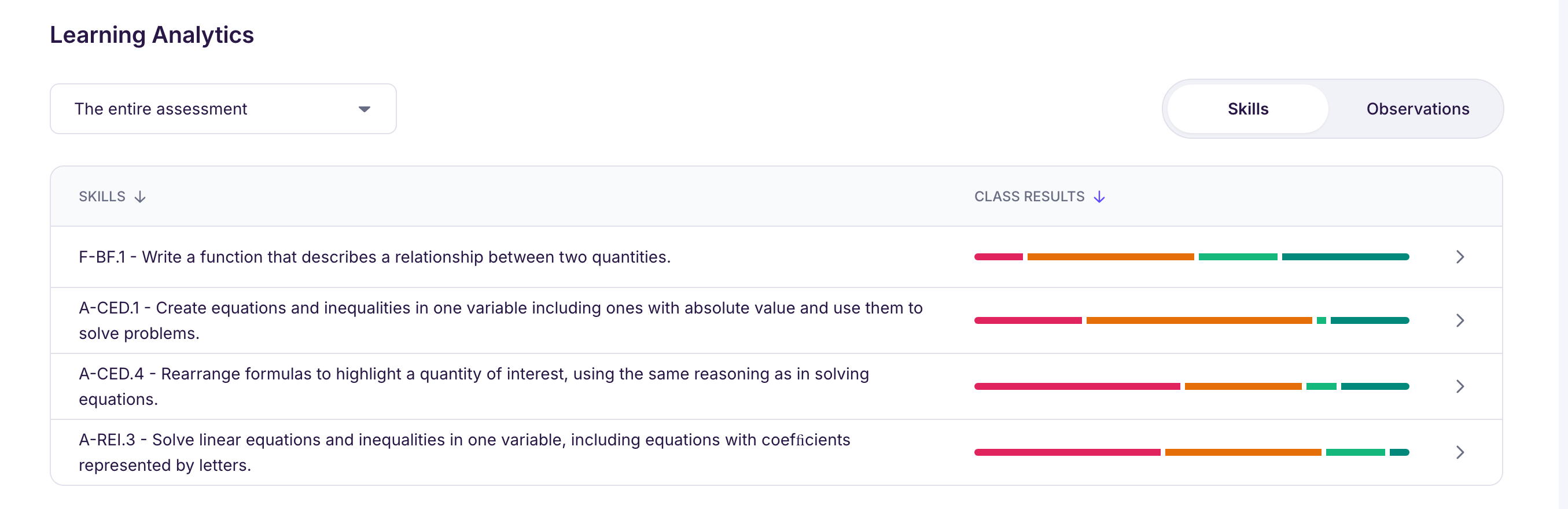
With this view, you can:
-
spot the skills students did best on and the ones they struggled with most,
-
set learning priorities for your next lesson,
-
launch targeted reteaching activities (generated by Ed.ai) on one or more skills,
-
dig into these results in a student’s individual profile.
Good to know: skills are matched to your assessment automatically, thanks to the work of our curriculum specialists. There’s nothing to set up: Ed.ai analyzes each exercise to identify what it assesses and gives you a clear picture.
💬 With Ed (the “Explore with Ed” button in the analysis, or “Talk to Ed!”), you can go further:
-
“Which skills is my class struggling with most?”
-
“Rank the skills by mastery level”
-
“Which students are struggling with solving linear equations?”
🎯 The goal: help you plan your lessons, your teaching choices and your reteaching based on the skills students actually worked on.